Thursday, January 1, 2026

What are the 5 Stages of a Design Sprint?


What is a Design Sprint?

A design sprint is a fast and structured approach used by teams to solve problems and test ideas in a short time. Instead of spending months building a product, teams can validate ideas quickly using collaboration, prototyping, and real user feedback.

Stage 1: Understand and Define

In this stage, the team focuses on understanding the problem clearly. They discuss the business challenge, user needs, and long-term goals. Experts share insights, and the team defines what success looks like. This stage sets a strong foundation for the entire sprint.

Stage 2: Sketch

Here, team members individually sketch different solution ideas. The goal is to explore multiple possibilities without judging them early. Sketching encourages creativity and helps bring diverse ideas to the table before choosing one direction.

Stage 3: Decide

In the decide stage, the team reviews all the sketches and selects the best idea. Through discussion and voting, one clear solution is finalized. A storyboard is created to show how the user will interact with the solution step by step.

Stage 4: Prototype

The chosen idea is converted into a realistic prototype. This prototype looks like a real product but is built quickly using simple tools. The focus is on showing how the solution works, not on building a perfect final product.

Stage 5: Validate

In the final stage, the prototype is tested with real users. Their feedback helps the team understand what works well and what needs improvement. This validation helps reduce risk before moving into full development.

Conclusion

The design sprint process helps teams move from ideas to tested solutions quickly. It saves time, reduces cost, and ensures that products are built around real user needs before investing heavily in development.

What are the 5 Stages of a Design Sprint?

Sunday, December 28, 2025

Virtualization vs Cloud Computing: What's the Difference?


What is Virtualization?

Virtualization is a technology that allows a single physical machine to run multiple virtual machines (VMs) using software called a hypervisor. Each virtual machine works like an independent system with its own operating system and applications. The main goal of virtualization is to use hardware resources efficiently.

What is Cloud Computing?

Cloud computing is a service model that provides computing resources such as servers, storage, databases, and applications over the internet. Users can access these resources on demand without owning or managing physical hardware. Cloud computing uses virtualization as its base but adds flexibility, scalability, and remote access.

Key Differences Between Virtualization and Cloud Computing

  • Nature: Virtualization is a technology, while cloud computing is a service delivered over the internet.
  • Purpose: Virtualization focuses on creating virtual environments on physical hardware. Cloud computing focuses on delivering IT resources to users on demand.
  • Scalability: Virtualization has limited scalability based on hardware capacity. Cloud computing allows easy scaling up or down as needed.
  • Accessibility: Virtualized systems are usually managed internally. Cloud services can be accessed from anywhere through the internet.
  • Dependency: Cloud computing depends on virtualization, but virtualization can exist without cloud computing.

How Virtualization Supports Cloud Computing

Virtualization forms the foundation of cloud computing by enabling the creation of virtual servers, storage, and networks. Cloud providers use virtualization to offer shared resources to multiple users efficiently.

Virtualization and cloud computing are closely related but serve different purposes. Virtualization creates virtual systems, while cloud computing delivers those systems as scalable services. Understanding their differences helps businesses choose the right technology for their needs.

Friday, December 26, 2025

Product Engineering: Process, Roles, and Best Practices

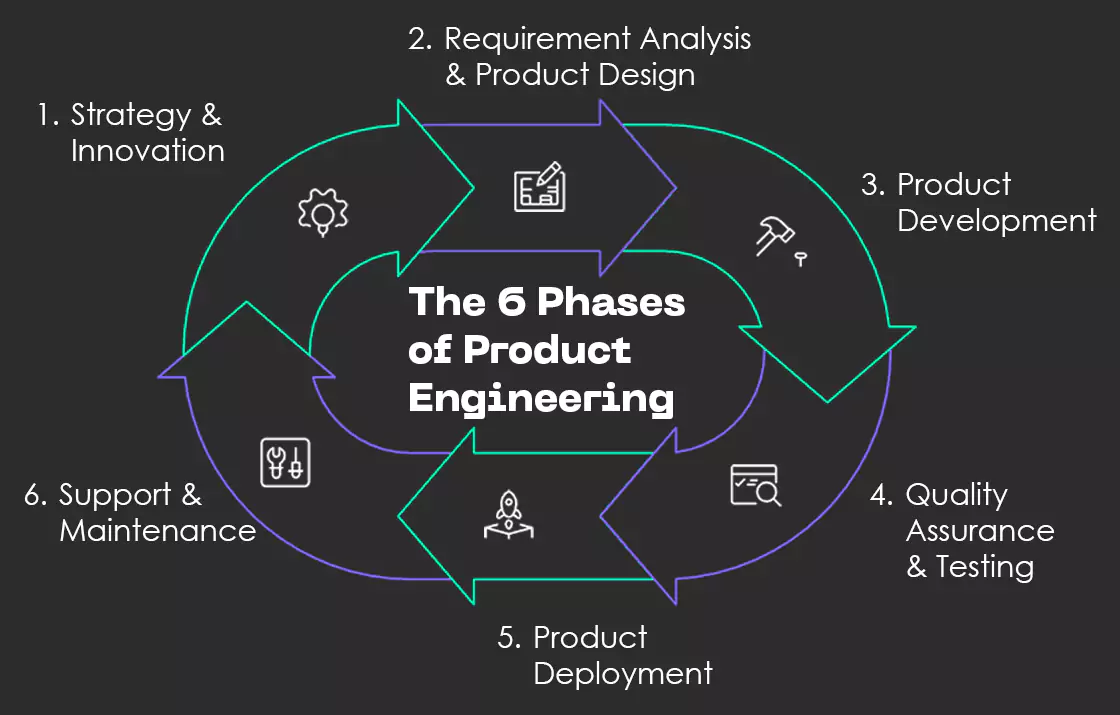
6 Phases of Product Engineering

What is Product Engineering ?
Product engineering is the end-to-end process of building a product. It starts from an idea and continues till the product is launched and improved over time. It is not only about coding. It also includes design, testing, deployment, and regular updates based on user feedback. 

Why Product Engineering Matters ?
Good product engineering helps: 
  • Build products that solve real user problems 
  • Improve product quality and performance 
  • Reduce time to market 
  • Keep costs under control 
  • Support continuous innovation 
The 6 Phases of Product Engineering: 
  1. Ideation: Generating product ideas based on market and user needs. 
  2. Research & Analysis: Studying users, market trends, and feasibility. 
  3. Design & Prototyping: Creating product designs and early prototypes. 
  4. Development: Building the product by writing code and integrating features. 
  5. Testing & Deployment: Testing the product for quality and releasing it to users. 
  6. Maintenance & Improvement: Fixing issues and improving the product using feedback. 

Key Roles in Product Engineering 
  • Product Manager: Defines the product vision and goals, coordinates the team, and communicates with stakeholders to ensure the product meets business and user needs. 
  • Software Engineers: Write the code, build product features, and ensure the technical quality and performance of the product. 
  • Quality Assurance (QA) Engineers: Test the product, identify and report bugs, and ensure the product is stable and ready for release. 
  • User Researchers: Study user behaviour and provide insights that help improve product design and user experience. 
  • Automation Engineers: Automate repetitive testing tasks to improve testing efficiency and reduce manual effort. 
  • Scrum Masters: Facilitate teamwork and ensure that Agile processes are followed smoothly throughout the development cycle. 
Best Practices (How to Work Better) 
Product engineering becomes more effective when teams follow certain best practices. Building and releasing the product in small stages helps test ideas early and reduce risks. Teams should focus on the right performance and user metrics to understand how the product is working. Close collaboration between engineering, design, and business teams ensures better decision-making. Maintaining proper documentation helps track processes and changes. Continuous improvement through regular updates and user feedback keeps the product relevant and high quality. 
 
Where Product Engineering Is Used 
Product engineering is used in many industries, especially in: 
  • Healthcare software 
  • Financial technology (FinTech) 
  • Retail and e-commerce 
  • Digital platforms 
  • Enterprise software solutions 
When product engineering is done properly, it results in high-quality products, faster time to market, better customer satisfaction, efficient teamwork, and lower long-term costs. 


Benefits of Good Product Engineering 
When product engineering is done properly, it results in high-quality products, faster time to market, better customer satisfaction, efficient teamwork, and lower long-term costs. 

Thursday, September 11, 2025

Why Combine Playwright with Cucumber BDD?


Hey there! Let me walk you through something that completely transformed how I approach test automation - combining Playwright with Cucumber BDD. Trust me, once you get this setup right, your testing game will never be the same.

Why This Combo is a Game-Changer

You know how Playwright test automation gives you incredible browser control, right? Well, when you pair it with Cucumber BDD for test automation, you get something magical - tests that both technical and non-technical team members can actually understand and contribute to.

Think about it: instead of cryptic code, you're writing scenarios in plain English that describe exactly what your application should do. That's the beauty of BDD test automation with Playwright.

Getting Started (It's Easier Than You Think!)

First things first - let's implement Playwright with Cucumber. You'll need to install both frameworks:

bash
npm install @playwright/test @cucumber/cucumber

Here's where it gets interesting. Create a features folder and write your first scenario:

gherkin
Feature: User Login
  Scenario: Successful login
    Given I am on the login page
    When I enter valid credentials
    Then I should see the dashboard

The Magic Happens in Step Definitions

This is where End-to-end testing with Playwright really shines. Your step definitions become the bridge between readable scenarios and powerful browser automation:

javascript
Given('I am on the login page', async function() {
  await this.page.goto('/login');
});

Pro Tips from the Trenches

Here's what I wish someone told me when I started: always use Page Object Models with your BDD setup. It keeps your step definitions clean and your tests maintainable.

Also, don't go overboard with scenarios initially. Start small, get comfortable with the workflow, then scale up.

Avoiding Common Headaches

The biggest mistake I see? Writing step definitions that are too specific. Keep them reusable! Instead of "When I click the blue submit button," use "When I submit the form."

Making It Production-Ready

Configure your cucumber.js file properly, set up proper reporting, and integrate with your CI/CD pipeline early. Your future self will thank you.

The Bottom Line

Combining Playwright with Cucumber BDD isn't just about better testing - it's about better communication, clearer requirements, and tests that actually document your application's behavior.

Start with one simple feature, get comfortable with the syntax, and gradually expand. Before you know it, you'll have a robust, maintainable test suite that everyone on your team can contribute to and understand.

Trust me, once you experience the clarity and power of this combination, you'll wonder how you ever tested without it!

Friday, August 1, 2025

ETL Testing Explained: Why It’s Critical for Data Quality


Hey there! Let's talk about ETL testing – and don't worry, I'll break it down so it's super easy to understand.

What Exactly is ETL Testing?

Think of ETL testing like being a quality inspector at a factory, but instead of checking products, you're checking data. ETL stands for Extract, Transform, Load – basically the three steps data goes through when moving from one place to another.

Imagine you're moving houses. You'd extract items from your old home, transform them (maybe pack them differently), and load them into your new place. ETL testing makes sure nothing gets lost or broken during this "data move."

Why Should You Care About ETL Testing?

Here's the thing – bad data leads to bad decisions. And in today's data-driven world, that's like driving blindfolded. ETL testing ensures your data pipeline is rock-solid, so when your CEO asks for that quarterly report, you're not scrambling to figure out why the numbers don't add up.

The Three Pillars of ETL Testing

Extract Testing: This is where we check if data is being pulled correctly from source systems. Are we getting all the records? Is the data format right? Think of it as making sure you didn't leave anything important behind when moving.

Transform Testing: Here's where the magic happens – and where things can go wrong. We're verifying that data transformations (like calculations, data type conversions, or business rule applications) work perfectly. It's like checking that your furniture fits through doorways and looks good in the new space.

Load Testing: Finally, we ensure data lands correctly in the target system. No duplicates, no missing records, and everything's in the right place.

Types of ETL Testing You Should Know

  • Data Completeness Testing: Making sure all expected data actually made it through the pipeline
  • Data Quality Testing: Checking for accuracy, consistency, and validity of your data
  • Performance Testing: Ensuring your ETL processes run efficiently, even with large datasets
  • Incremental Testing: Verifying that only new or changed data gets processed in subsequent runs

Common ETL Testing Challenges (And How to Tackle Them)

Let's be honest – ETL testing isn't always smooth sailing. You'll face issues like:

Data volume challenges: Testing with massive datasets can be overwhelming. Start small, then scale up gradually.

Complex transformations: Some business rules are intricate. Break them down into smaller, testable components.

Performance bottlenecks: Your ETL might work fine with sample data but crash with production volumes. Always test with realistic data sizes.

Best Practices That Actually Work

Here's what I've learned from years in the field:

Create comprehensive test cases that cover happy paths and edge cases. Document everything – trust me, future you will thank present you. Automate wherever possible because manual testing is time-consuming and error-prone.

Always validate both the technical aspects (data types, constraints) and business logic (calculations, rules). And please, test with production-like data volumes, not just sample datasets.

Getting Started: Your Next Steps

Ready to dive deeper? Our detailed  ETL testing  guide covers advanced techniques, tools, and real-world examples that'll take your testing game to the next level.

The Bottom Line

ETL testing might seem complex, but it's about being methodical and thorough. Start with the basics, build your confidence, and gradually tackle more complex scenarios. Remember, good ETL testing is like having a safety net – it catches problems before they become disasters.

The key is consistency and attention to detail. Master these fundamentals, and you'll be well on your way to becoming an ETL testing pro!

Tuesday, July 29, 2025

The Role of AI in Modern Product Development Lifecycles

Ever wondered how your favourite apps or software tools come to life? The product development lifecycle is basically the roadmap that IT teams follow to turn a brilliant idea into a working product that people want to use.

Think of it like building a house – you wouldn't just start hammering nails randomly, right? You'd need blueprints, permits, and a step-by-step plan. That's exactly what the product development lifecycle does for IT products.


What Exactly is the Product Development Lifecycle?

In simple terms, it's a structured approach that guides teams through every stage of creating digital products – from the initial "what if we built this?" moment to the final "wow, people are actually using it!" celebration. It's particularly crucial in IT because software development can get messy fast without proper planning.

The lifecycle ensures everyone's on the same page and nothing important gets forgotten along the way. Plus, it helps teams avoid those expensive "oops, we should have thought of that earlier" moments.

The Five Key Stages Explained

1. Discovery and Planning

This is where the magic begins. Teams research market needs, define target users, and figure out what problem they're actually solving. It's like detective work – you're gathering clues about what users really want.

2. Design and Prototyping

Here's where ideas start taking shape. Designers create wireframes and mockups while developers build early prototypes. Think of it as sketching your house before construction begins.

3. Development and Testing

The heavy lifting happens here. Developers write code, build features, and constantly test everything to make sure it works as expected. It's iterative – build a little, test a little, fix a little, repeat.

4. Launch and Deployment

Time to show your creation to the world! This involves releasing the product to users, monitoring performance, and being ready to fix any issues that pop up.

5. Maintenance and Evolution

The work doesn't stop at launch. Teams continuously update features, fix bugs, and add new functionality based on user feedback. It's like updating your smartphone – regular patches and improvements keep everything secure and running at peak performance.

Why This Matters for IT Teams

Following a structured lifecycle prevents common pitfalls like:

·       Building features nobody wants

·       Missing critical security requirements

·       Launching products full of bugs

·       Going over budget or timeline

It also helps teams communicate better, set realistic expectations, and deliver products that solve real problems.

The Game-Changer: AI in Product Development

Here's where things get exciting. Artificial intelligence is revolutionizing how IT teams approach product development. AI can automate testing, predict user behaviour, optimize performance, and even help with code generation.

Instead of spending weeks manually testing every feature, AI can run thousands of test scenarios in minutes. It can analyze user data to suggest which features to build next or automatically detect potential security vulnerabilities before they become problems.

For a deep dive into how AI is transforming every stage of the product development lifecycle, check out our comprehensive guide on The Role of AI in Transforming the PDLC. You'll discover specific AI tools, real-world examples, and practical strategies for implementing AI in your own development process.

The Bottom Line

The product development lifecycle isn't just a fancy framework – it's your roadmap to building IT products that people actually love using. Combined with AI's capabilities, it's becoming more efficient and effective than ever before.

Remember, successful products aren't built by accident. They're the result of following a proven process, staying focused on user needs, and continuously improving based on real-world feedback.

Monday, July 21, 2025

What Are Variational Autoencoders and How Do They Work?


What Are Variational Autoencoders (VAEs)?

Think of VAEs as smart compression algorithms that don't just squash data - they actually learn to understand and recreate it. Unlike regular autoencoders that deterministically compress data, VAEs add a probabilistic twist that makes them incredibly powerful for generating new content.

The Core Components:

  • Encoder Network: Takes your input data and maps it to a probability distribution in latent space, not just fixed points
  • Latent Space: A compressed representation where similar data points cluster together, creating meaningful patterns
  • Decoder Network: Takes samples from latent space and reconstructs them back into original data format
  • Variational Inference: The mathematical magic that ensures smooth, continuous latent representations

How VAEs Actually Work:

  • Encoding Process: Instead of mapping input to exact latent codes, VAEs output mean and variance parameters
  • Sampling Step: We randomly sample from the learned distribution using the reparameterization trick for backpropagation
  • Decoding Process: The sampled latent vector gets transformed back into reconstructed data
  • Loss Function: Combines reconstruction loss with KL divergence to balance accuracy and regularization

Why VAEs Are Game-Changers:

  • Generative Power: Unlike regular autoencoders, VAEs can generate entirely new data by sampling from latent space
  • Smooth Interpolation: Moving between points in latent space creates meaningful transitions in generated content
  • Dimensionality Reduction: Compresses high-dimensional data while preserving essential characteristics and relationships
  • Anomaly Detection: Points that reconstruct poorly often indicate outliers or anomalous data patterns

Real-World Applications:

  • Image Generation: Creating new faces, artwork, or enhancing image resolution with realistic details
  • Drug Discovery: Generating novel molecular structures with desired properties for pharmaceutical research
  • Text Generation: Creating coherent text samples and learning meaningful document representations
  • Recommendation Systems: Learning user preferences in latent space for better content suggestions

Key Advantages Over Traditional Methods:

  • Probabilistic Framework: Captures uncertainty and variation in data rather than deterministic mappings
  • Continuous Latent Space: Enables smooth interpolation between different data points seamlessly
  • Theoretical Foundation: Built on solid variational inference principles from Bayesian machine learning
  • Flexibility: Works across different data types - images, text, audio, and structured data

Common Challenges:

  • Posterior Collapse: Sometimes the model ignores latent variables, requiring careful architectural design
  • Blurry Outputs: VAEs tend to produce slightly blurred reconstructions compared to GANs
  • Hyperparameter Sensitivity: Balancing reconstruction and regularization terms requires careful tuning
  • Training Stability: Ensuring both encoder and decoder learn meaningful representations simultaneously

Getting Started Tips:

  • Start Simple: Begin with basic datasets like MNIST before tackling complex image generation tasks
  • Monitor KL Divergence: Keep track of this metric to ensure your model isn't collapsing
  • Experiment with Architectures: Try different encoder/decoder configurations to find optimal performance
  • Visualize Latent Space: Always plot your latent representations to understand what your model learned

VAEs represent a beautiful marriage between deep learning and probabilistic modeling. They're particularly powerful when you need both compression and generation capabilities in a single, theoretically grounded framework.

For a deeper dive into the mathematical foundations, implementation details, and advanced techniques, check out our comprehensive guide on Understanding Variational Autoencoders, where we break down the complex theory into practical, actionable insights.

What are the 5 Stages of a Design Sprint?

  What is a Design Sprint ? A design sprint is a fast and structured approach used by teams to solve problems and test ideas in a short tim...